Olympus OM 35mm film system close-up and macro equipment
T28 Macro Twin Flash 1
Introduction
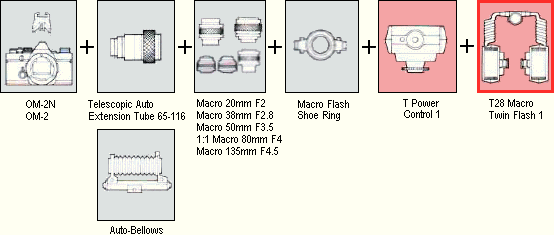
The T28 Macro Twin Flash 1 is one of 4 macro flash units for the Olympus OM cameras that use the T Power Control 1 and provide automatic exposure using the camera’s TTL flash control, so that you do not need to calculate the additional exposure required by magnification. It has 2 flash heads, and these are normally attached to the Macro Flash Shoe Ring that fits the filter mount of most of the Zuiko macro lenses.
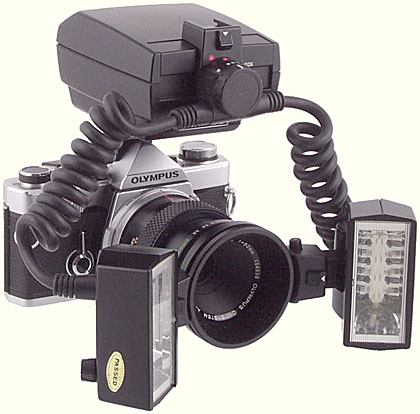
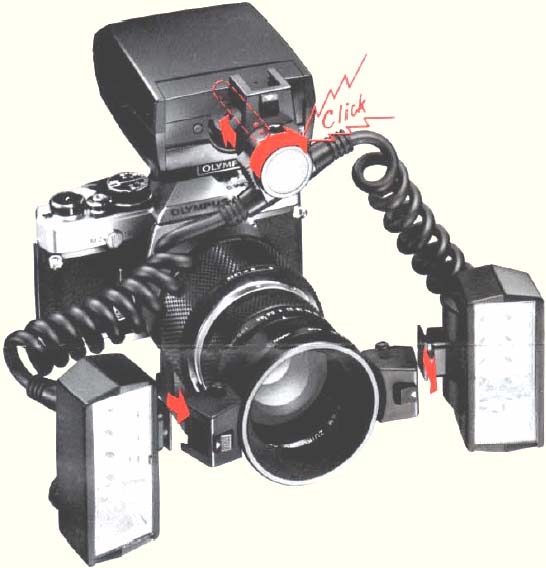
Olympus OM T28 Macro Twin Flash 1, with Macro Flash Shoe Ring, T Power Control 1, Zuiko Auto-Macro 50mm f/3.5 lens and OM-2 body
The Twin Flash provides more light than the T10 Ring Flash, and avoids the shadowless illumination that is associated with ring flashes. The 2 heads can be angled and rotated separately to alter the shadows on the subject, and diffusers and neutral density filters can be added to one or both heads to modify the illumination. The built-in modelling lights can be used to judge the effects.
When used with the Olympus OM-2, OM-2N, OM-2SP, OM-3, OM-3Ti, OM-4 or OM-4Ti cameras, automatic exposure using the camera’s TTL flash control is possible. Other cameras can also be used, but the exposure would need to be determined using a flash meter, trial and error, or the appropriate stick-on label for the Calculator Panels.
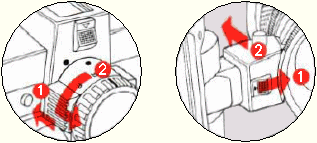
First screw the Shoe Ring onto the macro lens, and then attach the flash heads by sliding them into the shoes on the Ring. The heads lock into place using a groove in the base of the foot. To remove a head, push the button on the front face of the shoe in the direction of the white arrow, and then slide out the head.
To attach the plug to the Power Control, align the red dots on the plug and the Power Control, insert the plug, and turn it clockwise until it clicks and locks into place. To disconnect the plug, press and hold the small black button on the front of the Power Control, turn the plug anti-clockwise until the red dots are aligned, and then release the button and withdraw the plug.
The plug that attaches to the Power Control carries a rotary switch that allows the left, right or both flash heads to be used. On top of the plug, there is an accessory shoe to which one of the heads can be fitted.
When fitted to the Shoe Ring, the flash heads can point directly forwards, or they can be tilted inwards through about 65° to aim them at the subject, or they can be tilted outwards by about 45°; there are click stops at 7 positions. The flash heads can also be rotated through 360°, with click stops at 45° intervals (rotation is restricted to 45° when tilted inwards at 65°). The shoes can be moved around the Ring when the 2 black buttons on either side are held in; releasing the buttons locks the shoes in place.
When fitted to the Power Control plug, the flash head can point directly forwards, or it can be tilted downwards through about 45° to aim it at the subject, or it can be tilted upwards through about 65°; there are click stops at 7 positions. The flash head can also be rotated through 360°, with click stops at 45° intervals (rotation is restricted to 45° when tilted downwards at 45°).
The accessory foot on each head has a ¼ inch socket in its base; when the Shoe Ring is not used, this allows the head to be attached to a lighting stand or a tripod.
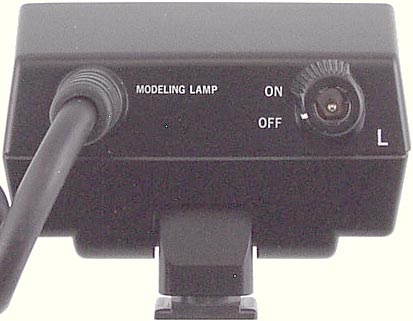
Rear of Olympus OM T28 Macro Twin Flash 1
The flash heads contain small bulbs that act as modelling lights and can be useful for focusing in dim light and to preview the lighting and any reflections. The modelling lights are much less bright than the flash, and so they do not need to be turned off when a photograph is taken. The socket at the rear of the head for powering the modelling lights is a standard 2.1 mm DC power socket. Power for the modelling lights can be provided from either the 6V Power Pack 2 or the AC Adapter 3. A ring around the power socket can be turned to switch the modelling lights on and off.
By reversing the Calculator Panel at the rear of the T Power Control 1, manual flash is possible, with a choice of 2 apertures. The Panel is calibrated for a single flash head; if both heads are used, then the film speed should be set 2/3 stops lower.
| Guide Number (100 ASA) | 28 m (one head) 22 m (both heads) |
|---|---|
| Color temperature | 5800° K |
| Coverage angle | 74° horizontal, 53° vertical |
| US stock no. | 107-012 |
| Introduced | |
| Discontinued | 2003 |
| 1988 US price | $223.00 |
Versions
Only one version is known.
Accessories
The T Power Control 1 is essential. The Macro Flash Shoe Ring is used to attach the flash heads to the 49mm or 55mm filter mount of a lens. The diffuser and filters in the ND Filter Set T32 can be used to reduce the light output of one or both flash heads. The modelling lights can be powered by either the AC Adapter 3 or the 6V Power Pack 2.
A Calculator Panel for use with one flash head and 50mm lenses was supplied. Self-adhesive labels were provided with the T Power Control 1 to stick onto a Calculator Panel to provide readings for manual flash with one flash head and the Zuiko Auto-Macro 20mm f/2, Zuiko Auto-Macro 38mm f/2.8, Zuiko Auto-Macro 80mm f/4, Zuiko Auto-Macro 135mm f/4.5 and 50mm lenses (including the Zuiko Auto-Macro 50mm f/3.5).
Other Uses
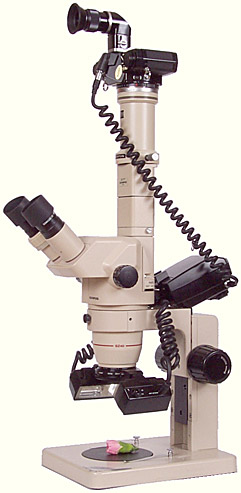
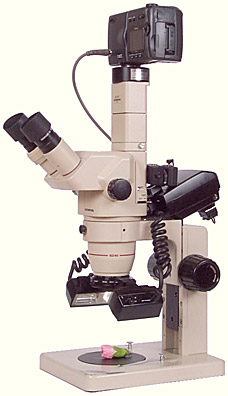
The T28 Macro Twin Flash 1 can be used with stereo microscopes that have a screw thread for attaching filters and supplementary lenses. Several Nikon and Olympus stereo microscopes have a 48 mm screw thread, and so with the aid of a 48→49 mm step-up ring, the Macro Flash Shoe Ring can be attached.
For use with non-Olympus cameras, the exposure can be adjusted using the diffuser and neutral-density filters from the ND Filter Set T32 over the flash heads, and the film speed and exposure adjustments in the camera.
 |
 |
|
| Olympus OM T28 Macro Twin Flash 1, with Macro Flash Shoe Ring, attached to an Olympus SZ-4045 trinocular stereo microscope, with Olympus OM-2 camera | Olympus OM T28 Macro Twin Flash 1, with Macro Flash Shoe Ring, attached to an Olympus SZ-4045 trinocular stereo microscope, with Nikon Coolpix 990 camera |
Instruction leaflet
Reproduced with permission from the copyright owner, Olympus Optical Co., Ltd
T28 MACRO TWIN FLASH 1
Combinations
Mounting
Dismounting
Lighting
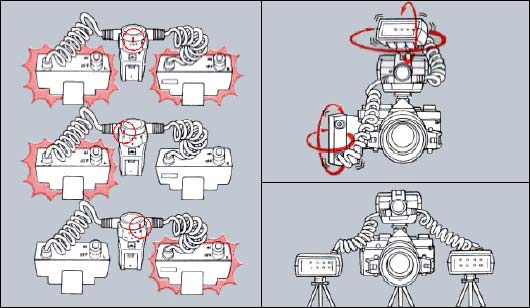
Modelling Lamp

Filters (usable also for T32 Electronic Flash)

Taking Pictures
Refer to the operation manual provided with the T Power Control 1/T10 Ring Flash.
TTL AUTO
| Objective | Magnifications | F/stop |
|---|---|---|
| Macro 135mm | 0.2× ~ 0.5× | F22 |
| Macro 80mm | 0.5× ~ 2× | F32 |
| Macro 50mm | 0.1× ~ 0.3× | F22 |
| Macro 38mm | 2× ~ 4× | F16 |
| Macro 20mm | 7× ~ 9× | F4 |
Any aperture can be used for TTL Auto Flash photography with the OM-2, within the TTL AUTO range.
Care and Storage
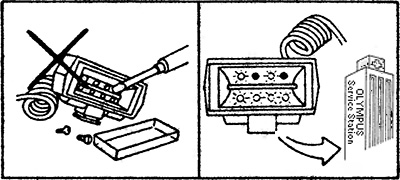
Specifications (T Power Control 1 + T28 Macro Twin Flash 1)
| Type: | TTL Centralized Control with twin flash unit. |
| Guide Number: | TTL AUTO: w/twin flash – 22(72); w/single flash – 28(92). MANUAL: HI 22(72) and LOW 9(29) at ISO/ASA 100, meters (feet) at 1 m flash-to-subject distance. |
| Coverage Angle: | 53° vertical, 74° horizontal (single flash). |
| Flash Duration: | 1/40,000 – 1/1,000 sec. |
| Number of Flashes: | 100 – 500 with AA alkaline batteries on TTL AUTO. |
| Recycling Time: | 0.2 – 10 sec. |
| TTL AUTO: | TTL Centralized Control flash with OM-2 (OM-2N). |
| MANUAL: | Selection of full flash GN/aperture/magnification: Via exposure calculator (w/single flash – GN28 exposure calculator, w/twin flash – ISO/ASA of the calculator should be set 2/3 stop lower). |
| Illuminators: | 8 bulbs built into each flash unit, operate on four 1.5V D batteries in optional 6V Power Pack 2, or AC Adapter 3. |
| Bounce Angle: | Vertical: 70° upward, 45° downward. Horizontal: 360°. |
| Spiral Cord Length: | Approx. 30cm (1ft.) |
| Dimensions & Weight: | 73 × 32 × 50mm (body only), 210g. (2.9 × 1.3 × 2.0 in., 7.4 oz.) |
OLYMPUS
OLYMPUS OPTICAL CO., LTD.
San-Ei Building, 22-2, Nishi Shinjuku 1-chome, Shinjuku-ku Tokyo, Japan. Tel 03-3340-2211
Sales Information File
Main specifications (T28 Macro Flashes + T Power Control 1)
| Type: Energy-saving, series-circuit type Centralized Control (TTL Auto) flash units with Manual capability. Normal Auto flash mode is available when the T28 Macro Single Flash 1 is mounted on the T Power Control 1. |
| Guide Number: 28m (ASA 100) with one flash head (Single Flash or Twin Flash) or 22m (ASA 100) with two flash heads (Twin Flash). |
| Coverage angle: 53° vertical, 74° horizontal. |
| Recycling time: 0.2–10 sec. with AA Alkaline batteries on TTL Auto. |
| Flashes per set of AA Alkaline batteries: 100~500 on TTL Auto. |
| Color temperature: 5800°K. |
| Mounting on lens: with Macro Flash Shoe Ring; 49mm and 55mm filter thread mount provided. |
| Mounting on T Power Control 1: only available with T28 Macro Single Flash 1. Allows normal flash photography and additional Normal Auto flash mode. |
| Electrical connection Flash to T Power Control 1: the spiral cord of the flash has a connecting plug with bayonet mount that plugs into the T Power Control 1. T Power Control 1 to camera: 1) clip-on type with hot shoe and lock 2) bracket type with Power Bounce Grip 2 and TTL Auto Cord T 3) free type with TTL Auto Cord 2 and TTL Auto Connector. |
| Calculator Panel: Reversible plate type – blank side for TTL Auto mode on cameras that support TTL flash and calculator side for Manual modes. Available with scale in meters and in feet for 20mm/F2, 38mm/F2.8, 50mm/F3.5, 80mm/F4 and 135mm/F4.5 macro lenses. |
| TTL AUTO Aperture setting: continuous, accords with aperture ring setting of camera-linked lens. Flash confirmation: flash ready and flash OK LED on the T Power Control 1. Viewfinder indication contact provided. |
| Normal Auto: only available with T28 Macro Single Flash with flash head mounted on T Power Control 1 for lenses used without extension (normal flash photography). Choice of three selectable apertures: F4 (working range 0.9~7m, 100 ASA), F5.6 (working range 0.6~5m, 100 ASA), F8 (working range 0.45~3.5m, 100 ASA). |
| Manual flash guide numbers: Single flash: HI-28 (ASA 100, m) and LOW-14 (ASA 100, m). Twin flash: HI-22 (ASA 100, m) and LOW-9 (ASA 100, m). |
| Power Sources: 1) Four 1.5V AA ‘penlight’ batteries (incl. Ni-Cd batteries) inside T Power Control 1 2) Power Bounce Grip 2 3) F.AC Adapter 3. |
| Illuminators: Eight electric bulbs are built into the flash heads. Power source: 6V Power Pack 2 or AC Adapter 3. |
| Dimensions and weight: T28 Macro Single Flash 1: 73×32×50mm, 110g. T28 Macro Twin Flash 1: 73×32×50mm, 210g. T Power Control 1: 81×70×104mm, 320g (without batteries). |
Exploded parts diagram
Send comments or questions to Alan Wood

Created 18th May 2001 — Updated 28th February 2021
Copyright © 2001–2021 Alan Wood