Olympus OM system close-up and macro equipment
ND Filter Set T32
Introduction
The diffuser and the filters can be used on the flash heads of the T28 Macro Twin Flash 1 and the T28 Macro Single Flash 1 – the statement in the instruction leaflet that they can only be used with the T32 is out of date.
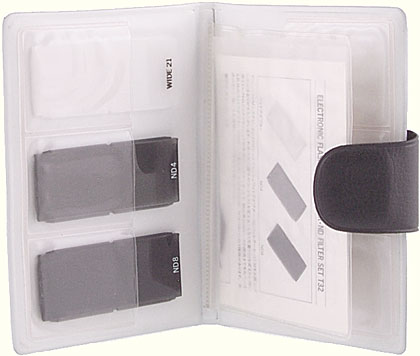
Olympus OM ND Filter Set T32
To fit a diffuser or a filter over the front of the flash head, slide it in from one side, with the bevelled edges behind the metal lips at the top and bottom of the head, until it clicks into place. To remove a filter, slide it out to one side.
The diffuser softens the light and reduces the output by 1 stop. The ND4 neutral density filter reduces the output by 2 stops. The ND8 neutral density filter reduces the output by 3 stops.
The filters are supplied in a folding plastic case that has 4 compartments on each side (and so can hold 8 filters) plus a central holder for the instruction leaflet.
| US catalog no. | 107-045 |
|---|---|
| Introduced | 1979 |
| Discontinued | 2003 |
Versions
Only one version is known.
Instruction leaflet
Reproduced with permission from the copyright owner, Olympus Optical Co., Ltd
ELECTRONIC FLASH WIDE ADAPTER • ND FILTER SET T32
This set of 3 filters (a wide-angle diffuser and two neutral density filters) are designed specially for use with the Electronic Flash T32. The Wide Adapter increases the T32’s angle of coverage to the picture area of a 21mm super wide-angle lens, and also provides a softer, more natural illumination. The ND filter reduces the quantity of flash light without affecting color quality.
(1) Turn the T32’s diffuser window fully upward (90°).
(2) Fit the filter into two grooves (dovetail)
(3) until it stops with a click.
• Cautions
- These units cannot be used with any electronic flash other than the T32.
- When attaching to the T32, hold the filter firmly in place; otherwise it will slip off when the diffuser window is turned to 0° position.
- Clean the filter with a soft, dry cloth. Do not use organic solvents (alcohol, thinner, etc.).
- In Manual flash mode
F stop = guide number
flash-to-subject distance - For TTL AUTO working range (with OM-2 or OM-2N), see below.
• T32 Guide Number (ASA 100)
| Filter | None (T32 alone) |
Wide Adapter |
ND4 | ND8 |
|---|---|---|---|---|
| GN (meter) |
32 | 22 | 16 | 11 |
| GN (feet) |
104 | 72 | 52 | 36 |
• TTL AUTO working range (ASA 100, cm/in.)
| Wide Adapter | ND4 | ND8 | ||||
|---|---|---|---|---|---|---|
| f | cm | inch | cm | inch | cm | inch |
| 22 | 13–100 | 4.8–39.6 | 9–70 | 3.6–27.6 | 7–50 | 2.4–19.2 |
| 16 | 17–130 | 7.2–51.6 | 13–100 | 4.8–39.6 | 9–70 | 3.6–27.6 |
| 11 | 25–200 | 9.6–79.2 | 17–130 | 7.2–51.6 | 13–100 | 4.8–39.6 |
| 8 | 35–270 | 13.2–106.8 | 25–200 | 9.6–79.2 | 17–130 | 7.2–51.6 |
| 5.6 | 50–390 | 19.2–153.6 | 35–270 | 13.2–106.8 | 25–200 | 9.6–79.2 |
| 4 | 70–550 | 27.6–216 | 50–390 | 19.2–153.6 | 35–270 | 13.2–106.8 |
| 2.8 | 100–780 | 39.6–307.2 | 70–550 | 27.6–216 | 50–390 | 19.2–153.6 |
| 2 | 140–1100 | 55.2–433.2 | 100–780 | 39.6–307.2 | 70–550 | 27.6–216 |
OLYMPUS
OLYMPUS OPTICAL CO., LTD.
SAN-EI BUILDING 22-2, NISHI SHINJUKU 1-CHOME, SHINJUKU-KU, TOKYO, JAPAN
Sales Information File
| F-stop | w/o filter (GN 32) |
Wide Adapter (GN 22) |
ND 4 (GN 16) |
ND 8 (GN 11) |
|---|---|---|---|---|
| 22 | 0.18–1.4 | 0.13–1 | 0.09–0.7 | 0.07–50 |
| 16 | 0.25–2 | 0.17–1.3 | 0.13–1 | 0.09–0.7 |
| 11 | 0.35–2.8 | 0.25–2 | 0.17–1.3 | 0.13–1 |
| 8 | 0.5–4 | 0.35–2.8 | 0.25–2 | 0.17–1.3 |
| 5.6 | 0.7–5.6 | 0.5–4 | 0.35–2.8 | 0.25–2 |
| 4 | 1–8 | 0.7–5.6 | 0.5–4 | 0.35–2.8 |
| 2.8 | 1.4–11 | 1–8 | 0.7–5.6 | 0.5–4 |
| 2 | 2–16 | 1.4–11 | 1–8 | 0.7–5.6 |
Send comments or questions to Alan Wood

Created 18th May 2001 — Updated 4th August 2005
Copyright © 2001–2005 Alan Wood